

Archive for the ‘Data 14-15’ category
Introduction to the Data
As we have taken an ethnographic approach to this research the tutor’s voice is very prominent throughout the data.
We have worked hard to ensure the student’s voice is also heard through involving them continually throughout the year.
Each post within this section draws on the data from the tutors regular discussions, us sharing our observations from our classrooms and sharing feedback from our students with each other.


Learner feedback: Mo’s functional skills students
The students were asked to evaluate the use of the ipads
The questions asked were:
1. What was the best thing about the class ipads?
The students expressed how they enjoyed being able to do independent research, being given time to explore the apps available, using the online dictionary (dictionary.com)and thesaurus (Visual Thesaurus), use the exisisting apps on the desktop and being given time to play freely on the ipad as a reward at the end of sessions. Some students said they enjoyed sharing their knowledge of the ipad with others who were not familiar and they expressed they felt confident in doing so.
Students were given the opportunity to evaluate each session and what they had learnt and they felt this was a good idea to record our activities on the notes app on the ipad. Read more ►
Learner feedback: the role of tech on the Cert Ed/PGCE
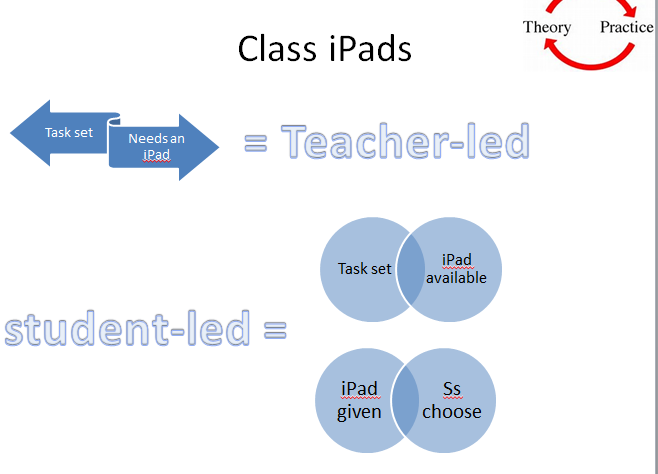 In the final class for the Cert Ed/PGCE group I started the session by reviewing my findings for my project and explaining to the students why, although initally planned to use the iPads in a variety of ways, I had only offered the iPads for students to choose to use if they wanted. There was never any planned task that required them.
Looking at the Teacher-Led activities the students then explored two apps that lend themselves to these kinds of activities: Socrative and Show Me.
Socrative: They really liked this app. Very quickly they were able to make quizzes & they discussed how they could use this with their students.
Show Me: They explored this app, some students made videos, others explored videos made by others.
For both these apps we discussed how they can be used three ways: Read more ►

Learner Feedback: BYOD, maths apps & supporting children’s learning
One of the major points brought up in the E3 class by the students with young school aged children was that they are spending more time with them doing maths homework and using maths apps with them. For example, one student said that while traveling on the bus, she gave one of her children her phone and instead of putting a game on she put the penguin maths app. She said her child loves this app.
The same student also talked about how she is more confident in doing more every day maths exercises with her child e.g. While out shopping they are rounding the cost of items and reading the labels together. This student is also in the E2 English class so it is great ot see a maths/English cross over here. Read more ►
Mid-point review: Learning & Tutor Feedback: Mo’s students
Student feedback
Every time we used the iPads I got some informal feedback from the students. The students say they prefer the iPads to using the netbooks. One student had asked that they use the iPads to do some project-type work. He asked if they could use the camera on the iPad to take photos, eg around town. The students said didn’t want to use them ‘just for the sake of it’, but were never really clear about what this meant. They would use the ‘free time’ activities to go onto FaceBook even though we’d agreed not to do this.
Tutor thoughts Read more ►
A mid-point review: ESOL & the Cert Ed
Throughout the project Cathy felt that she was struggling with the project and how she was using the class set of iPads with her groups.
The 16-18 ESOL group were a low Entry 1 group and the iPads were used in two different ways.
1) Teacher-led: a task would be developed in which the iPads would be needed. For example, when doing a vocabulary lesson on houses there was a planned stage where students needed to look on Google images for houses in their own country and share this with others in their group. This personalised the task for the students and gace them a chance to practice using the new vocabulary.
This year Cathy has continued to explore the use of Whiteboard apps. Following the closure of Ask3, Cathy looked at Educreations, Screen Chomp and ShowMe. She chose ShowMe as discussed in this post.
A mid-point review: maths & a freedom to choose in class
The original plan had been to undertake the digital logo task with each group to provide a starting point to the project. However, Yvonnne already knew that some of the students in the E3 maths group didn’t have any technologies so felt that the digital logo task wouldn’t be approopriate to use in the class.
Instead, Yvonne lead a whole-class discussion on the different types of technologies everyone had and how these were used in everyday life.

Class Discussion on Tech Ownership

Getting Started: Access, Interest & Barriers – ESOL & PGCE
Cathy is lucky to have the ESOL group for Functional Skills ICT, so undertaking the digital logo task fitted in well with the course as an inital assessment task. The iPads were introduced to the ESOL group very early in the course but the research project was not introduced. The group were a very low level group and Cathy made the decision that at this early stage of the course they did not have the language to be able to discuss this further, and as I do not have the student’s consent I cannot share the work they produced in the class.
In the Cert Ed/PGCE group every student had their own technologies and brought these into class most weeks. The course is already quite tech-heavy and the first few weeks of the course are spent familiairising the students with the college’s VLE, the university’s online portal, their e-portfolio and the group’s Yammer page. For this reason the project wasn’t introduced to the group until late in the first term when Cathy delivered a sessoin on Digital Literacies. Read more ►
Getting Started: Access, Interest & Barriers – maths
Yvonne introduced the project to her two groups (E3 and GCSE maths groups) fairly early on in the year. Before repeating the digital logo task from last year Yvonne felt it was important to introduce the students to the project and to the technology before asking them what they already had and what they already used. Everyone said they were happy to take part in the project. They understood taking part would involve some paperwork-filling and some questions but the focus would be on using the technology and how this would help them with their maths.

Digital Logos task
Entry 3 Maths Group Read more ►

Getting Started: Access, Interest and Barrier – Functional Skills English
Mo – we need a section here about the first few times you took the iPads into your classses.
